
 SOP & Compliance Checklists
There's a class of work where "done" isn't enough — someone has to put their name to it. A QA gate before a release, a batch record on a production line, a change that touches audited systems, a procedure a regulator might one day ask about. For that work you need more than a set of ticked boxes: you need a record of who approved it, in what role, at what point, and proof that nobody quietly changed it afterwards. That's what a compliance sign-off gives a checklist.
Native monday.com can mark an item approved, but it doesn't certify a checklist of steps or capture the state of the work at the moment of approval. SOP & Compliance Checklists adds a formal sign-off to any checklist inside an item — recording the role, the person, the timestamp, and the completion at signing — and flags the moment that approved work is touched again. This guide covers why that matters, how to switch it on and use it, the header states to watch, the governance that locks it down, and one honest caveat about what it is and isn't.
Why a sign-off step matters
Most checklists answer one question: are the steps done? A sign-off answers a different, harder one: does someone with authority certify that they were done correctly, and can you prove it later? Those are the moments where a plain progress bar falls short — a release checklist where QA has to bless the build before it ships, an SOP run that a supervisor has to approve, an audited process where an inspector expects a named approver and a date.
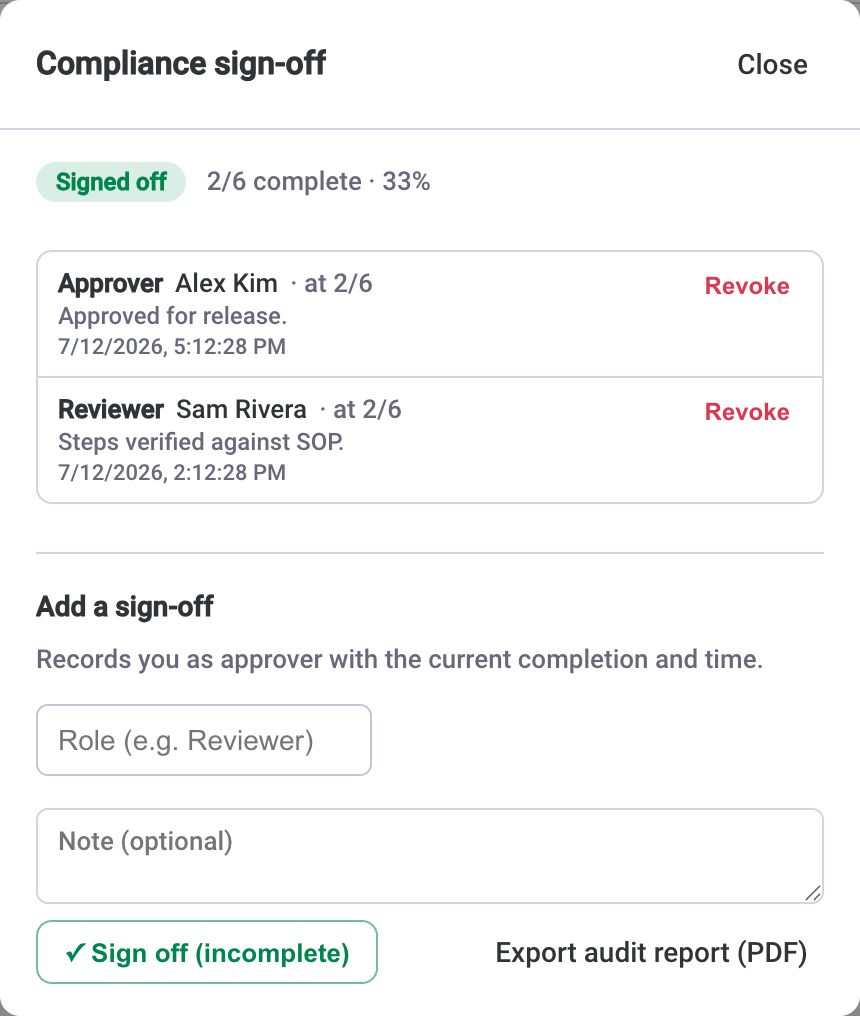
A formal sign-off certifies the whole checklist, not an individual line. It records the signer's role — Reviewer, Approver, whatever your process calls for — along with who signed, when, and the completion at the time of signing, for example "at 6/6." That last detail matters: it pins the approval to a specific state of the work, so an approval given at partial completion can't later be mistaken for one given at the finish.
Pair sign-off with the audit trailSign-off tells you who approved; the audit trail tells you what happened along the way. Every change — status, assignment, due date, estimate, and the sign-off itself — is recorded with who and when, so an approval sits on top of a complete history rather than a snapshot.
How to turn on and use sign-off
Sign-off is off by default, which is deliberate — most checklists don't need it, and you don't want an approval step cluttering routine work. An admin switches it on where it's needed. Here's the sequence:
- As an admin, open Settings and enable Compliance sign-off. This turns on the sign-off panel for the checklists that need certification.
- Work the checklist as normal — assign steps, set due dates, tick them off. When the procedure is complete, open the sign-off panel.
- Add a sign-off and choose your role — for example, Reviewer. The record captures your name, the exact time, and the completion at signing, such as "at 6/6."
- For a two-stage approval, have the next person add their own sign-off — an Approver after the Reviewer. Sign-offs stack, so the Reviewer-then-Approver chain lives on the same checklist.
- If something needs to change and be re-certified, any signer or an admin can revoke a sign-off, which clears that approval so it can be re-run cleanly.
When you need the record on paper — or in a folder an auditor can open — export an audit report (PDF) from Settings → Audit report or from the sign-off panel. It carries a completion summary and sign-off status, the sign-off record itself, the full task table, the complete activity trail, and a SHA-256 document fingerprint that's deterministic and tamper-evident: the same data always produces the same hash, and any later change produces a different one.
The header states, and why amber matters
The checklist header carries the sign-off status so you can read it at a glance, without opening the panel. It moves through three states:
- Sign off — pending. The checklist hasn't been certified yet; the header prompts for it.
- Signed off — green. At least one sign-off is on record and the work matches what was approved.
- Modified after sign-off — amber. Something changed after the approval, and the header says so.
The amber state is the one that earns its keep. It doesn't just watch the completion count — it catches any change to the work. Edit a task's text, reassign a step, reorder the list, swap which items are done: any of those flips the header to Modified after sign-off. That's possible because a content signature of the work is captured at the moment of signing, and the header compares against it. A stale approval can't quietly pass for a current one.
An approval is only trustworthy if you can tell whether the work still matches it. The moment someone touches a signed-off checklist, the header should stop pretending everything's fine — and it does.
Lock the process down with governance
Sign-off records who approved; governance controls who can change the work in the first place. Both live in Settings, and an admin turns them on where the process demands it:
- Lock structure — only admins can add, edit, delete, or reorder tasks, or apply templates. The steps become fixed, so a certified procedure can't be quietly reshaped by anyone who happens to have the item open.
- Restrict completion — only a task's assignee or an admin can mark it done. That keeps one person from ticking off work that belongs to someone else, which is exactly the kind of shortcut a sign-off is meant to prevent.
Used together, these turn a checklist into a controlled procedure: the structure is protected, completion is attributable, and the sign-off certifies the result. Every one of those actions still lands in the audit trail — for the full picture of how that history is recorded and streamed, see the guide on the audit trail in monday.com.
Where the data livesSOP & Compliance Checklists runs entirely on monday.com's own infrastructure and storage — there's no external database or separate hosting, and your sign-off records, audit trail, and reports never leave your monday.com account.
The honest caveat: compliance-style, not certified
It's worth being straight about what this is. The sign-off, the audit trail, and the document fingerprint are compliance-style controls built for internal governance and quality-management use — the kind of evidence that makes an internal review or a customer audit go smoothly, and that keeps your own house in order.
They are not a validated, regulator-certified electronic-signature system. If you're in a space that requires a formally validated e-signature — 21 CFR Part 11 for regulated pharma and medical work, for instance — this doesn't replace a validated system, and you shouldn't treat the fingerprint as a legal signature. Think of it as strong, tamper-evident internal governance that sits comfortably inside a QMS, not as a certified compliance product. Used with that understanding, it does a lot of honest work: a named approver, a role, a timestamp, a complete history, and a hash that changes the instant the record does.