
 SOP & Compliance Checklists
Every team has procedures that are supposed to be done the same way each time — the deploy runbook, the client-onboarding sequence, the incident-response steps, the month-end close. A standard operating procedure (SOP) captures that agreed way of working so the outcome doesn't depend on who happens to be doing it. The catch is that most SOPs live in a document nobody opens, and the further the procedure sits from the actual work, the less it gets followed.
The fix is to stop treating the SOP as a document and start treating it as a checklist that lives on the work itself. This guide walks through what an SOP really is, how to model one as a monday.com checklist — sections for phases, dependencies for order, owners and due dates for accountability — how to turn it into a reusable template and a recurring routine, and how to prove it was actually followed with a sign-off.
What an SOP is — and why they stop being followed
An SOP is a documented, repeatable way to perform a task: the steps, their order, who owns each one, and what "done" looks like. Its whole value is consistency — anyone with the procedure should be able to run it and get the same result. In regulated or quality-managed teams it's also the record that the right steps were taken.
So why do SOPs drift? Because the document and the work live in different places. The procedure is a page in a wiki; the work happens on a board, in tickets, in chat. People run from memory, skip a step under pressure, or do things out of order — and there's no trace of what actually happened until something breaks. A written SOP tells you what should happen; it doesn't make it happen, and it doesn't prove it did.
SOP & Compliance Checklists closes that gap by putting the procedure inside the monday.com item where the work is already tracked. Instead of a separate document, the SOP becomes a live checklist with owners, ordering and a full history — and because the app runs entirely on monday.com's own infrastructure, none of that data leaves your account.
Model the SOP as a monday.com checklist
Translating an SOP into a checklist is mostly a matter of mapping the parts you already have. Here's the sequence:
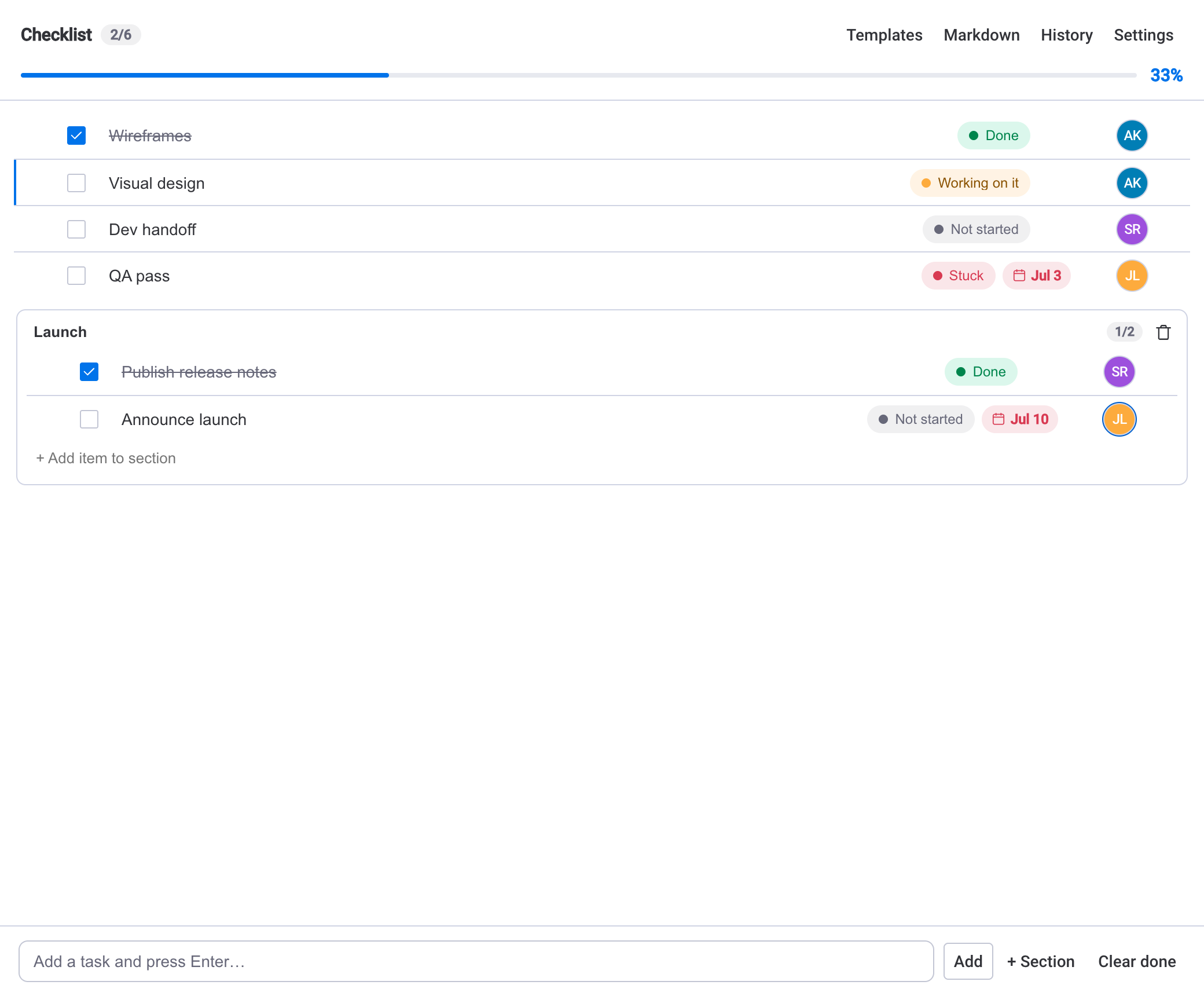
- Open the monday.com item the procedure belongs to — a release, an onboarding, an audit — and open its Checklist tab.
- Break the procedure into sections, one per phase. A deploy SOP might be "Pre-flight," "Deploy," "Verify," "Rollback plan"; an onboarding SOP might be "Before day one," "Day one," "First week."
- Add each step as a task under its section, worded as a clear action. Give every task an owner from the board's people and a due date where timing matters.
- Add dependencies so steps that can't start until an earlier one is done stay gated — verification waits until the deploy step is checked, sign-off waits until verification passes.
- Where a step has a size, add an effort estimate so the procedure carries a realistic sense of how long a phase should take.
The result is the SOP, but executable: the same steps, in the same order, with a named owner on each and the sequence enforced rather than assumed.
Lock the structure once it's rightOnce the procedure is modelled correctly, an admin can turn on Lock structure in Settings so only admins can add, edit, reorder or delete tasks. Pair it with Restrict completion — only a task's assignee or an admin can mark it done — and the SOP stays exactly as written, cycle after cycle.
Turn it into a template and a recurring routine
An SOP you build once and never reuse isn't much of a standard. The point is to run the identical procedure every time it's needed, so the next step is to lift it out of the single item and make it repeatable.
Save the finished checklist as a template. From there you can apply it to any item in one click, set it as a board default so every new item starts with the procedure already attached, auto-apply it as items are created, or bulk-apply it to a backlog of existing items. Duplicating an item carries the checklist with it too. That's how one procedure becomes the standard across a board — or across boards — without anyone rebuilding the steps. There's a fuller walkthrough in the guide on building checklist templates in monday.com.
For procedures that come back on a schedule — a daily safety check, a weekly release routine, a monthly close — set the checklist to recur. It resets its steps at the start of each cycle and keeps a completion streak, so the routine shows up ready to run instead of being cloned by hand. See how to build recurring checklists in monday.com for the details of cadence and streaks.
A procedure written in a document is a suggestion. A procedure that resets on schedule, with owners and a gated order, is a process people actually run.
Keep board columns in step
Checklist completion can sync to a number or status column, so an SOP's progress is visible in the board table and dashboards without anyone re-keying it. That means your existing automations — reminders, escalations, status changes — can react to how far through the procedure an item is.
Prove the SOP was followed with sign-off
For a lot of procedures, running them isn't enough — you need to show they were run correctly. That's where sign-off and the audit trail come in.
Compliance sign-off is off by default; an admin enables it in Settings → Compliance sign-off. Once on, a formal sign-off certifies the whole checklist and records the signer's role (Reviewer, Approver, and so on), who they are, when they signed, and the completion at that moment — "at 6/6," for example. Sign-offs stack, so a Reviewer can sign and then an Approver, and any signer or an admin can revoke.
The header status makes the state obvious at a glance: Sign off while pending, a green Signed off once certified, and an amber Modified after sign-off the moment anything changes. That last state is the important one — it catches any change to the work, not just a different completion count. Edit a task's text, reassign it, reorder the list, or swap which step is done, and the badge flips to amber, because sign-off captures a content signature of the whole checklist at the moment it's signed.
Underneath that sits a full audit trail. Every change — status, assignment, due date, estimate, sign-off — is recorded with who did it and when. Each task has its own History, and a board-wide History tab streams every item's activity, filterable by checklist. When you need something portable, export an audit report (PDF) from Settings → Audit report or the sign-off panel: it bundles a completion summary and sign-off status, the sign-off record, the full task table, the complete activity trail, and a SHA-256 document fingerprint. The fingerprint is deterministic and tamper-evident — the same data always produces the same hash, and any later change produces a different one.
Compliance-style, not a certified e-signatureSign-off, the audit trail and the content fingerprint are compliance-style controls for internal governance and QMS use. They are not a validated, regulator-certified electronic-signature system — they're not, for instance, 21 CFR Part 11 validated. Treat them as strong internal evidence, not a substitute for a certified platform where one is legally required.
There's a dedicated deep-dive on this in adding compliance sign-off to monday.com checklists if formal review and approval is the main reason you're here.
When an SOP checklist is the right tool
Reach for an SOP checklist whenever a procedure needs to run the same way every time and the order matters: deploy runbooks, onboarding, incident response, audits, safety checks, month-end close, recurring client deliverables. Sections give the procedure its shape, dependencies protect the sequence, templates make it repeatable, and sign-off turns "we followed it" into something you can show.
If the work is a genuine one-off with no repeat and no need to prove anything, a plain checklist is enough — you don't need templates or sign-off. But the moment consistency, order, or evidence matters, modelling the SOP as a monday.com checklist earns its keep: the procedure lives on the work, runs the same way each time, and leaves a record that it did.