
 monday.com · Guide
Some work never really ends. New-hire onboarding, the Monday-morning ops routine, a weekly release checklist, the month-end close — the same steps come back around, and every time someone rebuilds them from memory or a copied note. A recurring checklist in monday.com solves that: you define the steps once, and they reset on a schedule so the right tasks show up when they're due, already assigned and already in order.
The trouble is that plain monday.com items don't reset. You can duplicate a template board or clone an item, but that's manual, easy to forget, and it loses your history. This guide walks through what a recurring routine actually is, how to set one up cleanly, and how to keep the steps in the right sequence with dependencies and a streak that tells you whether the routine is holding.
What a recurring checklist actually does
A recurring checklist is a set of steps attached to a monday.com item that repeats on a cadence — daily, weekly, or monthly — and resets itself at the start of each cycle. Instead of one static to-do list, you get a routine that comes back on schedule with its steps unchecked and ready to run again.
The native monday.com checklist column doesn't repeat, and subitems don't reset on their own either. If you want a routine, you're normally left duplicating items by hand. SOP & Compliance Checklists adds a real checklist to every item and lets you turn any of those checklists into a recurring routine, so the reset happens for you rather than becoming another manual task on someone's plate.
If you're still deciding whether a checklist is even the right container for this kind of work, it's worth reading checklists vs. subitems in monday.com first — recurring routines are one of the clearest cases where a checklist wins.
How to set up a recurring routine
The setup is short. The goal is to build the checklist once, get the order right, then tell it to repeat. Here's the sequence:
- Open the monday.com item that owns the routine — the board could be "Weekly Ops," "Client Onboarding," or whatever fits — and open its Checklist tab.
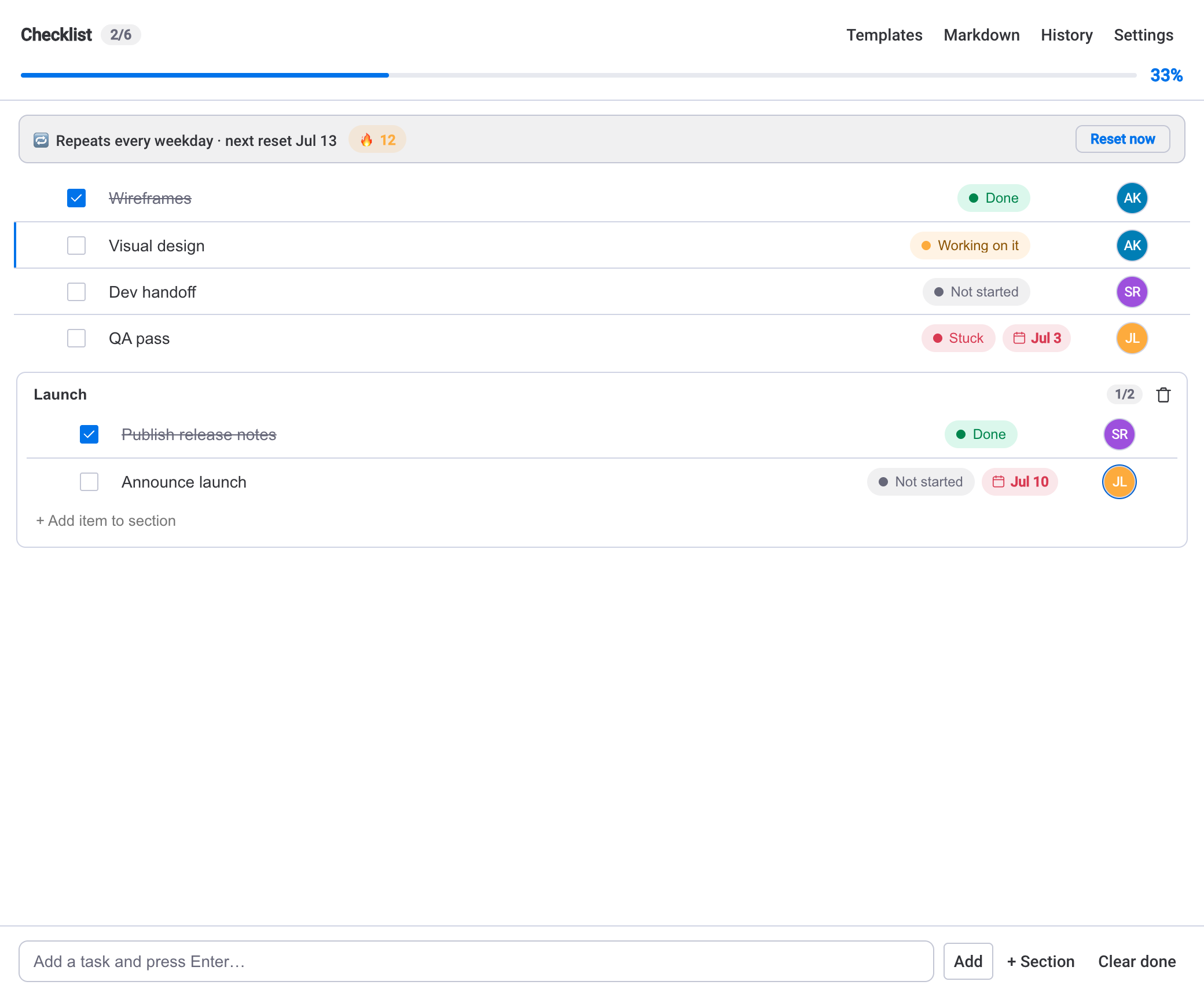
- Add each step in the order you want it done. Give steps an owner from the board's people and a due date where it matters, and group related steps into sections if the routine has distinct phases.
- Set the checklist to repeat and pick the cadence: daily, weekly, or monthly. The steps reset at the start of each new cycle.
- If some steps can't start until others are done, add dependencies so blocked steps wait and the next available task surfaces on its own.
- Let it run for a cycle and check the streak — it counts how many cycles you've completed in a row, which is your quick read on whether the routine is actually being kept.
Save it as a template firstIf several boards run the same routine, save the checklist as a template before you set it recurring. Then you can apply the same steps to another item in one click and set that copy to repeat too — no rebuilding from scratch.
Keep the order honest with dependencies and streaks
A routine is only useful if it's done in the right order. Dependencies handle that. When a step depends on another, it stays blocked until the earlier step is checked, and the next actionable task surfaces instead. That keeps people from ticking things out of sequence — closing the books before reconciliation is done, or shipping before the checks pass.
The streak is the accountability side. Every completed cycle adds to the streak; miss one and it resets. It's a small signal, but a broken streak is an early sign that a routine has quietly stopped being followed — long before anything shows up as a missed deadline.
A recurring routine you never look at is just a reminder. Dependencies and a streak turn it into a process you can trust.
Sync progress so the board can see it
Checklist completion can sync to a number or status column, so a routine's progress shows up in the board table and in dashboards without anyone re-typing it. The next due date can also mirror to a native monday.com Date column, which means your existing automations — reminders, notifications, status changes — can fire off the routine's schedule instead of a separate manual field.
Track recurring routines across boards
One routine is easy to eyeball. A team running a dozen of them across several boards is where things slip. A few views help you keep the whole set honest:
- Board View — a per-item progress table for one board, with a task-status breakdown and progress buckets, plus search, sort, and filter to find the routine that's falling behind.
- Dashboard widget — rolls checklist progress up across multiple boards with a per-board breakdown and a needs-attention list, so a lagging routine is visible without opening each board.
- My Tasks — every checklist step assigned to you across the board, grouped by due date; you can tick a step, change its status, or re-date it without opening the item.
- Analytics — burn-up and velocity trends, a projected finish date, per-person workload, and an on-time SLA built from daily snapshots, so you can see whether a routine is consistently on time or consistently late.
For a fuller look at reading progress across many boards at once, see how to track checklist progress across your monday.com boards.
Where the data livesSOP & Compliance Checklists runs entirely on monday.com's own infrastructure and storage — there's no external database or separate hosting, and your routine data never leaves your monday.com account.
When a recurring checklist is the right tool
Reach for a recurring checklist when the same set of steps comes back on a predictable cadence and the order matters: weekly releases, daily stand-up prep, monthly close, onboarding, recurring client deliverables, compliance checks. The routine handles the reset, dependencies protect the sequence, and the streak tells you whether the habit is holding.
If the work is a one-off with no repeat, a plain checklist or a template is enough — you don't need the cadence. And if you mainly need long-lived sub-tasks that live in the board itself rather than a repeating routine, that's the subitems trade-off covered in the comparison guide. The recurring routine earns its keep exactly when "do these same steps again, in order, on schedule" is the whole job.