
 monday.com · Guide
Every monday.com board starts simple. Then one item grows a life of its own: a launch, an onboarding, a client handoff, a piece of content that needs six people to touch it. You need a way to break down tasks in monday.com into smaller steps and see how far along each one is. The two obvious tools for that are subitems and a monday.com checklist — and they are not the same thing.
They look similar in a screenshot, so teams pick one almost at random and live with the consequences. This article walks through what each is actually good at, where each one hurts, and how to decide without regretting it three months later.
What each one actually is
A subitem is a smaller board row nested under a parent item. It behaves like any monday.com row: it has its own columns, its own status, its own people, its own automations. It shows up in board reports and can be filtered and grouped. In effect, a subitem is a mini-item, and a group of them is a mini-board living inside one row.
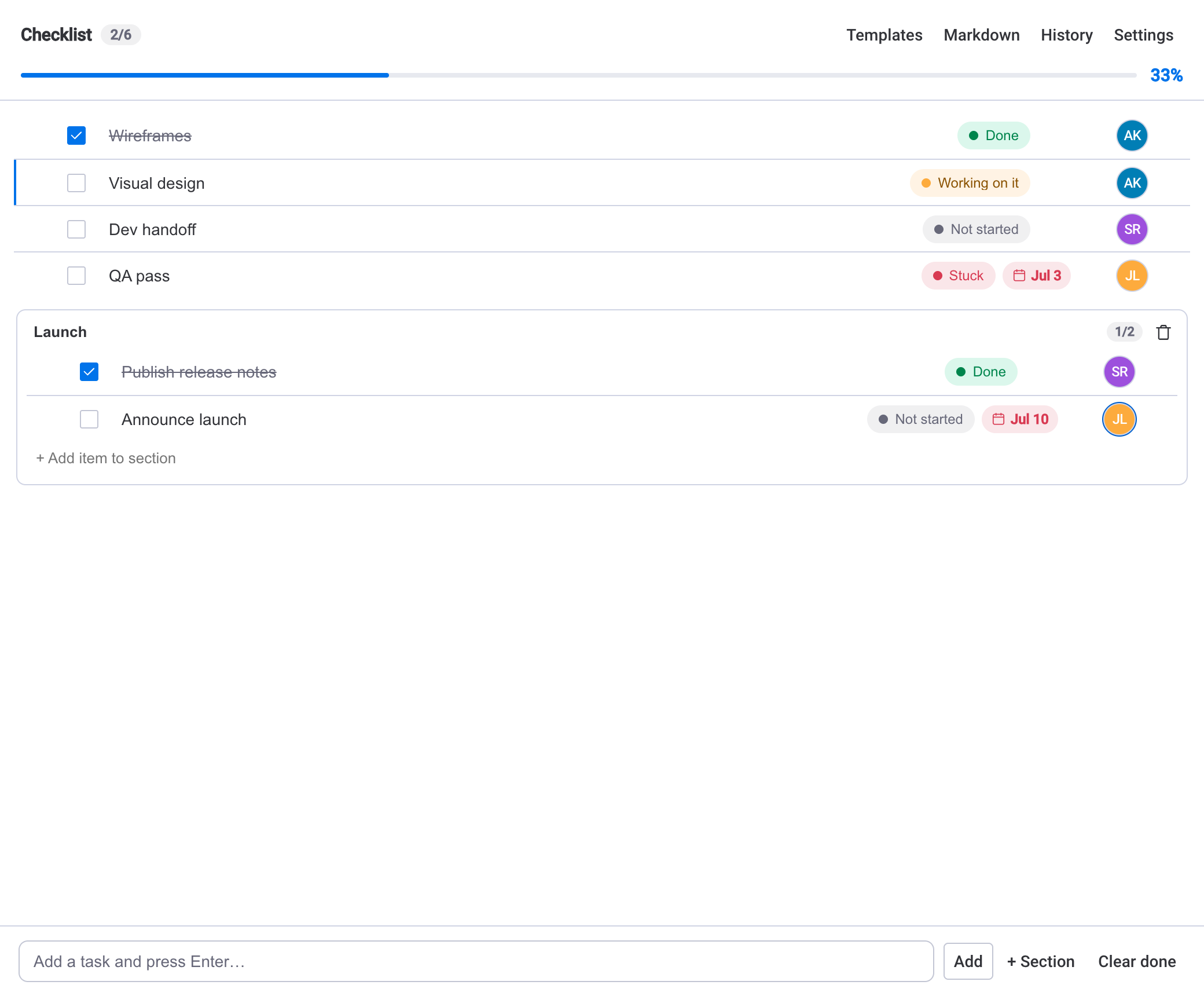
A monday.com checklist is a lightweight list of steps that lives inside the item itself. With SOP & Compliance Checklists, every item gets a Checklist tab where you add steps, tick them off, and watch a live progress bar, counter and percentage move. Each step can still carry a status, an owner picked from the board's people, and a due date, and steps can be grouped into sections and dragged to reorder — but they stay inside the item rather than becoming board rows of their own.
The one-line differenceSubitems are rows on your board. Checklist steps are contents of one item. That single distinction drives almost every decision below.
When subitems are the right call
Reach for subitems when the smaller pieces are real work items in their own right — things a person owns, tracks, and reports on as if they were standalone tasks.
- Each piece has its own timeline, budget, or effort you need to roll up in board reports — subitems feed the same columns and dashboards as normal rows.
- You want native monday.com automations firing on each piece independently (status changes, notifications, date triggers).
- The pieces might be reassigned, reprioritized, or filtered across the whole board, not just within one parent.
- Different people genuinely own different pieces and each expects them to appear in their own board views.
The trade-off is weight. Subitems multiply your row count, add columns to maintain, and can make a board noisy fast. If you only wanted a checklist, subitems are a heavy way to get one.
When a monday.com checklist wins
Reach for a monday.com checklist when the steps are a process, not a portfolio — a repeatable sequence that describes how to finish the item rather than a set of independently tracked deliverables.
- The steps are the same most times you do this kind of work, so you want to save them as a template and apply them to the next item in one click.
- You care about completion, not per-step board reporting — a progress bar and percentage tell the whole story.
- The item's own row should stay clean; you don't want ten extra rows on the board for one launch.
- The routine repeats. Recurring checklists can reset daily, weekly or monthly, keep a completion streak, and use step dependencies so a blocked step waits and the next task surfaces on its own.
Because SOP & Compliance Checklists runs entirely on monday.com's own infrastructure and storage, none of this data leaves your account — there's no external database or separate hosting to worry about.
You don't have to choose per boardUse subitems for the deliverables that need their own timelines and automations, and put the repeatable sub-process for each one inside a checklist. Structure and routine, on the same item.
A quick way to decide
When you're staring at an item and can't tell which tool fits, run through these questions in order. The first "yes" usually settles it.
- Does each piece need to show up in board reports or dashboards on its own? If yes, use subitems.
- Does each piece need its own monday.com automation or its own place in someone's board view? If yes, use subitems.
- Are the steps roughly the same every time you do this work? If yes, a checklist template will save you the most time.
- Do you mainly care about "how done is this item?" If yes, a checklist's progress bar answers that in one glance.
- Does the routine repeat on a schedule? If yes, a recurring checklist handles the reset and the streak for you.
If you still feel pulled both ways, it's a sign the item is doing two jobs: a few genuine deliverables plus a process to run each one. That's the case for using both, not for forcing everything into one.
Keeping progress visible on the board
The usual worry about checklists is that they hide inside items. Subitems win on visibility because they surface on the board by default. A checklist can close most of that gap: completion can sync to a number or status column so the item's progress shows right in the board table and in dashboards, and the next due date can be mirrored to a native monday.com Date column so your automations still fire.
From there you also get a Board View that lists every item's checklist progress with an overview and per-item completion, plus a dashboard widget that rolls progress up across multiple boards. So the choice isn't really "reportable subitems vs. hidden checklist" — it's which reporting shape fits the work.
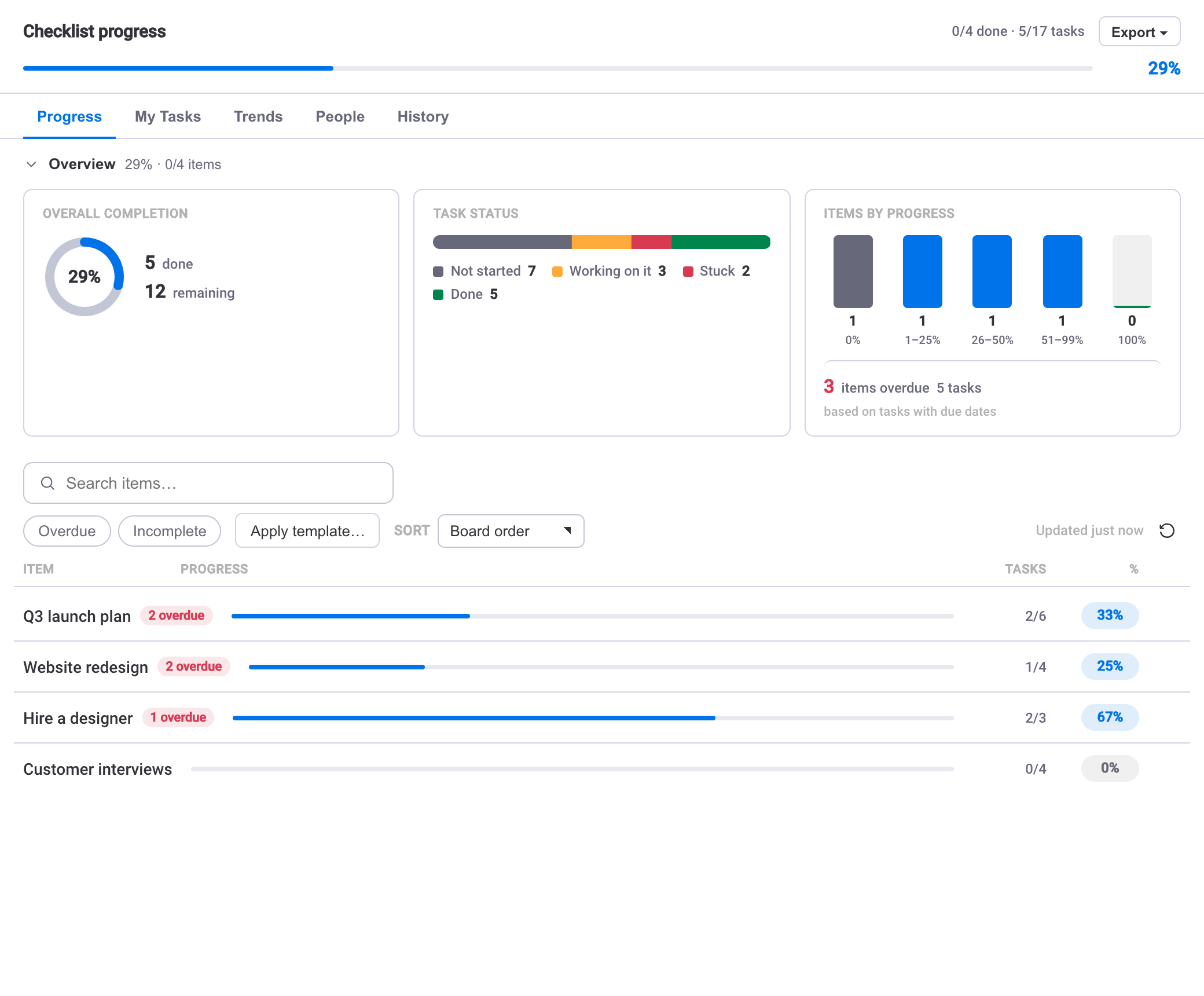
If tracking completion across many boards is your real goal, that's worth its own read — see how to track checklist progress across your monday.com boards for the roll-up views in detail. And if your steps repeat on a cadence, building recurring checklists in monday.com covers resets, streaks and dependencies.
Subitems answer "what are the pieces?" A checklist answers "how done is this one?" Most items only need one of those questions solved well.