
 Jira · Guide
You set Jira WIP limits to keep work moving, but the numbers on a board column only tell half the story. A column can sit comfortably under its limit while a single issue quietly rots inside it for eleven days. The count looks healthy. The flow is not.
WIP limits, status aging and SLAs are three views of the same question: is work actually progressing, or just sitting? This article walks through how the three fit together, where each one falls short on its own, and how to combine them so stuck work surfaces before it turns into a missed deadline.
What Jira WIP limits do (and what they miss)
A WIP (work-in-progress) limit caps how many issues can sit in a column at once. If your In Progress column is limited to five, the sixth issue can't move in until something moves out. The idea comes from Kanban: less concurrent work usually means faster completion, because people finish things instead of starting more of them.
Jira supports column WIP limits on Kanban boards natively. When a column exceeds its limit, the board highlights it. That's a useful signal, and you should use it.
But a WIP limit measures how many issues are in a state, not how long any of them has been there. Three problems follow from that:
- An issue can sit for two weeks in a column that never breaches its limit. Nothing turns red, because the count is fine.
- Aging is invisible at the item level. The column tells you the aggregate is under control; it says nothing about the one ticket dragging your cycle time up.
- WIP limits react to volume, not time. By the time a column overflows, work may already have been stuck upstream for days.
WIP vs. timeA WIP limit answers "how much work is here right now?" Status aging answers "how long has this specific work been sitting?" You need both to see the real state of a board.
How status aging fills the gap
Status aging (also called time in status) measures how long each issue has been in its current state. It's an item-level clock: this ticket entered Code Review nine days ago and hasn't moved. That's the signal a WIP count can't give you.
Aging is where bottlenecks actually show up. When work piles into a stage faster than it leaves, individual issues start aging even if the column hasn't overflowed yet. Watching time-in-status lets you catch the slowdown early, while there's still room to act. If you're new to the concept, our explainer on what status aging is in Jira covers why issues get stuck in the first place.
The catch: Jira doesn't surface time-in-status prominently on its own, and it won't proactively tell you when an issue crosses a reasonable age for a given state. That's the job Time in Status — Status Aging Alerts for Jira does. It tracks how long each issue has sat in each status and alerts you when one ages past its expected time, and its Aging WIP report plots every in-flight issue's status age against its threshold, so a stuck ticket reaches you instead of waiting to be noticed. For the workflow of hunting these down, see how to find stuck Jira issues before they blow a deadline.
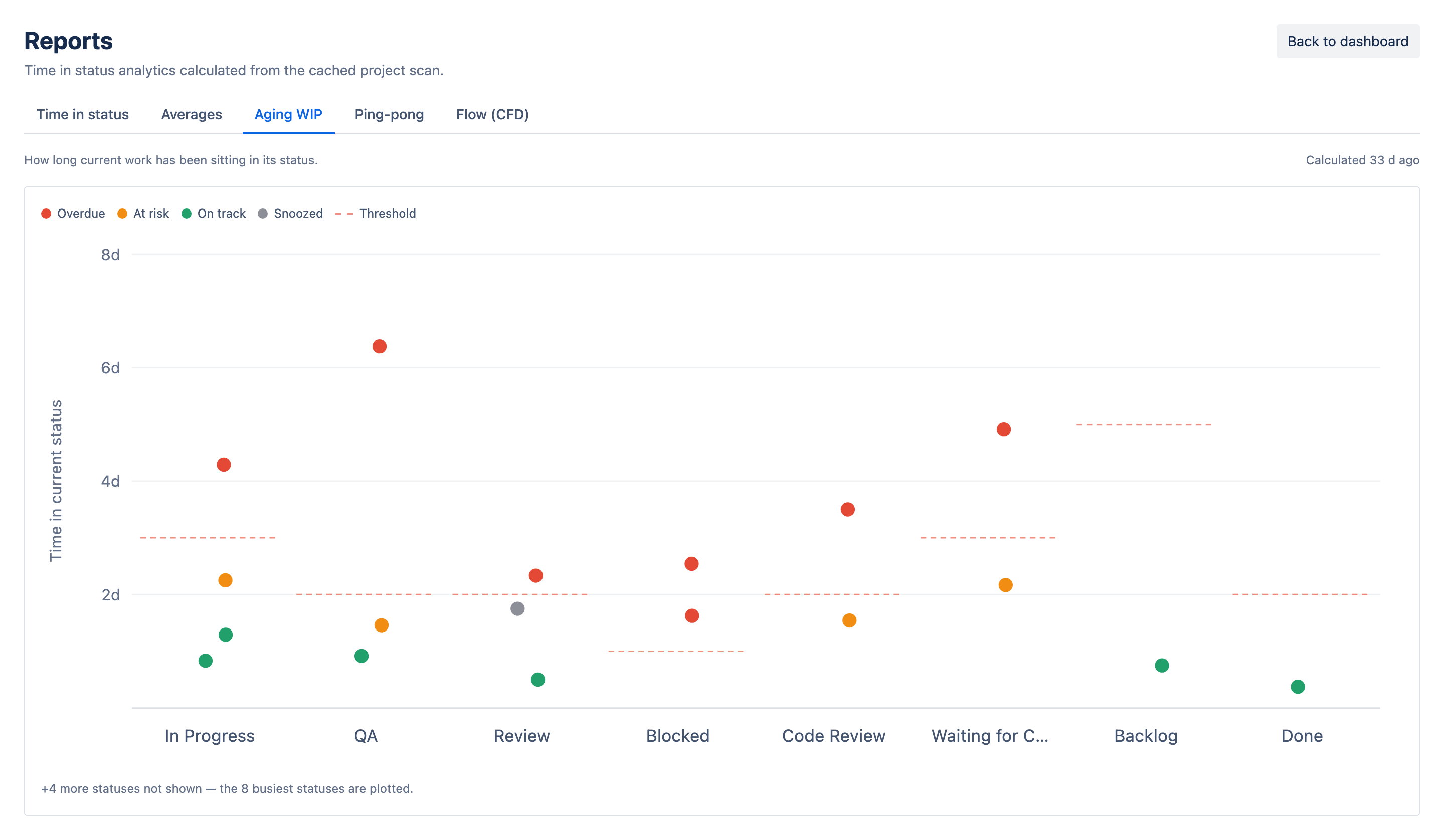
A WIP limit tells you the column is crowded. Status aging tells you which issue has been stuck since last Tuesday.
Where SLAs come in
An SLA (service-level agreement) is a promise about time: a support request gets a first response within four hours, a bug fix ships within five business days. SLAs are common in service and support work, and Jira Service Management has built-in SLA tracking. Even outside a formal SLA product, most teams carry informal ones: "we don't let anything sit in review more than two days."
SLAs and status aging overlap, but they aren't the same thing. An SLA is usually measured end-to-end or against a customer promise. Status aging is measured per state. The connection is practical: a single status that ages too long is the most common way an SLA gets blown.
If your SLA is a five-day resolution and an issue spends four of those days idle in Waiting for Deployment, the SLA breach was decided long before the clock officially ran out. Watching per-status aging gives you an early warning that a downstream SLA is at risk while you can still recover it.
Combining WIP limits, aging and SLAs
None of the three is enough alone. WIP limits control how much you start. Status aging tells you what's stuck. SLAs define what "too slow" means to the people waiting on you. Used together, they cover volume, time and commitment. Here's a practical order to put them in place:
- Set WIP limits per column on your Kanban board. Start conservative and adjust. The goal is to make overflow visible, not to hit a magic number.
- Decide an expected time-in-status for each stage. Review might be one day; QA might be three. These don't have to be exact, just honest about what "normal" looks like.
- Turn on aging alerts so an issue that crosses its expected time reaches you automatically, instead of you scanning boards by hand.
- Map the risky statuses to your SLAs. If a stage regularly ages past its budget, that's the stage quietly breaking your SLA. Fix the bottleneck there first.
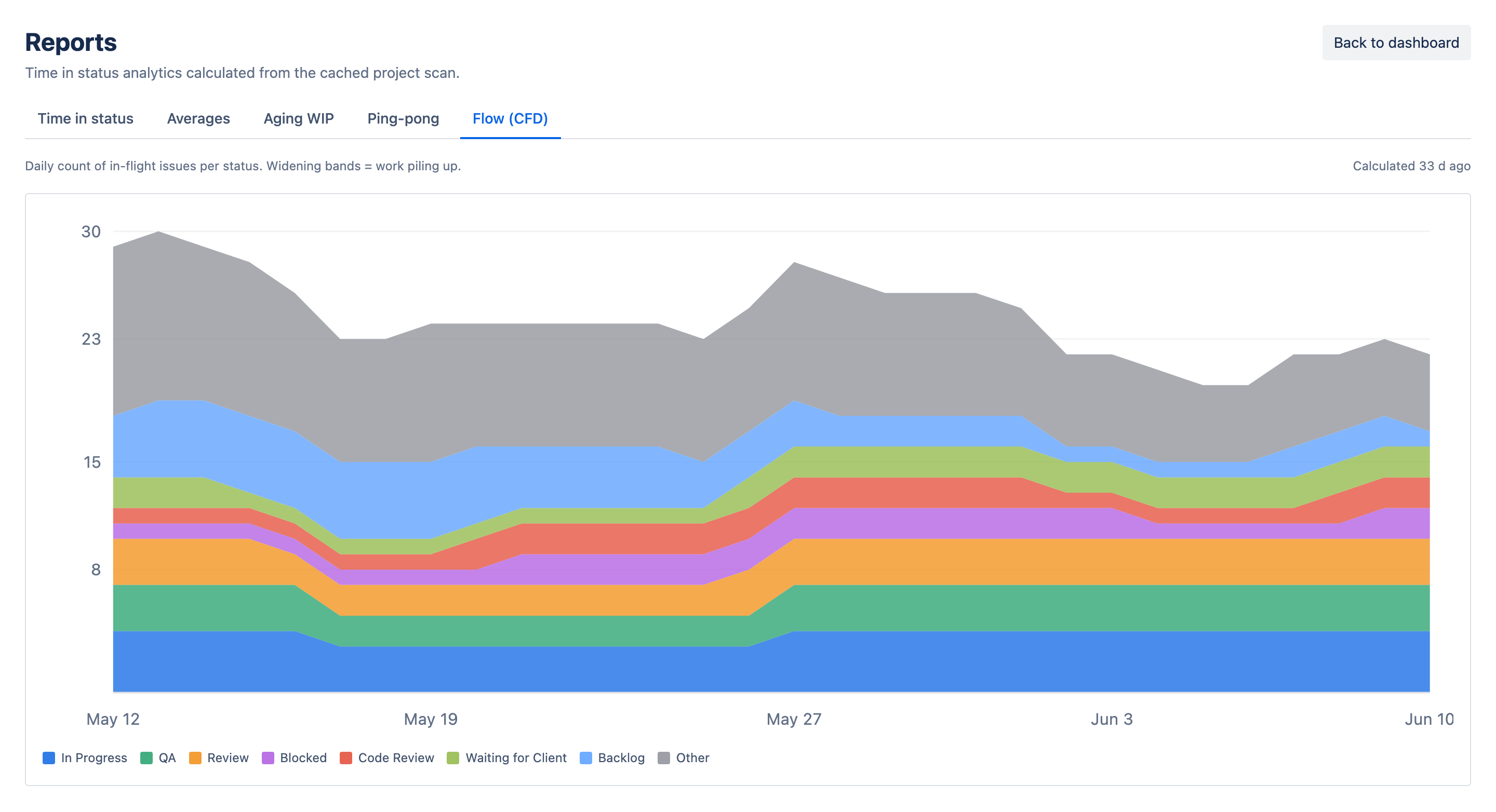
- Review the pattern weekly. If the same column both fills up and ages, you've found a genuine bottleneck, not a one-off.
Start with one statusDon't instrument the whole board at once. Pick the one stage where work most often stalls (usually review or QA), set an expected time, watch it for two weeks, then expand.
A simple weekly routine
You don't need a dashboard project to make this work. A short weekly habit is enough for most teams:
- Scan for any column sitting at or over its WIP limit, and ask why work isn't leaving it.
- Look at the oldest issue in each active status. If the oldest is far past its expected time, that stage is your bottleneck this week.
- Check whether any aging issue is tied to an SLA promise, and prioritize it before the clock forces the decision.
- Note anything that shows up two weeks running. Repeated aging in the same place is a process problem, not bad luck.
For the underlying mechanics of why issues age and how bottlenecks form, our deeper piece on status aging in Jira is a good companion to this routine.
The point of all three tools is the same: catch stuck work while you can still do something about it. WIP limits keep you from starting too much. Aging alerts tell you what's stalled. SLAs remind you what the wait costs. Line them up and a board stops hiding its slowest work.