
 Jira · Guide
Your Jira board looks healthy. Columns have cards, people are assigned, nothing is on fire. Then a release date arrives and one issue has quietly been sitting in In Review for eleven days. Nobody flagged it, because nobody was looking at how long it had been there. This is exactly what status aging in Jira makes visible, and it is one of the most common reasons work slips without anyone noticing.
Status aging measures how long an issue has sat in its current status. It is a simple idea with a big payoff: a card can look perfectly normal on the board while it ages in place for days. Watch that aging and you catch bottlenecks early, instead of discovering them in the retro when the deadline has already moved.
What is status aging in Jira?
Status aging (often called time in status) is the amount of time an issue has spent in the status it currently occupies. If a ticket moved into QA on Monday and it is now Thursday, its status age is three days. Move it to Done and the clock for that status stops; a fresh clock starts wherever it lands next.
Jira tracks the transitions in an issue's history, but the board itself does not shout at you when a card has grown old in one column. A status that should take a few hours and a status that has quietly held a card for two weeks look identical in a normal column view. Status aging turns that invisible dwell time into a number you can sort, filter, and act on.
Aging vs. ageIssue age usually means the total time since the issue was created. Status age is narrower and more useful for flow: it resets on every transition, so it points at the exact column where work is stalling right now.
Status aging vs. cycle time and lead time
It helps to place status aging next to two metrics you have probably heard about, because they answer different questions and arrive at different moments.
- Lead time — the total time from when a request is created (or committed to) until it is delivered. It is the customer's view: "how long did my thing take?"
- Cycle time — the time from when the team actually starts work until it is finished. It is the team's view of throughput, usually measured across the active statuses.
- Status aging / time in status — how long an issue has sat in one particular status. It is the live, per-column view of where an in-flight issue is stuck today.
The crucial difference is timing. Cycle time and lead time are mostly lagging measures: you calculate them after work is done, from a report. By then the slow issue has already shipped late. Status aging is a leading signal. It tells you an issue is stalling while it is still stalling, which is the only point where you can still do something about it.
Cycle time tells you the train was late. Status aging tells you it is still sitting at the platform — while there's time to move it.
Why Jira issues get stuck (and look fine doing it)
Stuck work rarely announces itself. An issue can be assigned, commented on recently, and still be going nowhere. When you look at where time actually disappears, a handful of causes show up again and again.
- Hidden blockers. A ticket depends on another team, an API, or an answer from a customer. It stays In Progress while it is really waiting, so nothing on the board signals a problem.
- "Waiting on" statuses that never get watched. Waiting for Customer, Blocked, On Hold — these are honest statuses, but without an aging clock they become quiet parking lots where issues sit for weeks.
- Review and QA queues. Work piles up faster than reviewers can pull it. Each individual card looks fine; the queue is the bottleneck, and it is invisible unless you measure dwell time.
- WIP overload. When everyone has five things in progress, everything moves slowly. High work-in-progress inflates time in status across the board because attention is split too many ways.
- Handoffs between people or teams. Every transition is a chance for a card to land in someone's blind spot and age there until a status meeting rediscovers it.
None of these are exotic. They are the ordinary texture of a busy team. The problem is not that issues get stuck — some always will — it is that they get stuck silently. If you want to go deeper on the two levers that keep queues moving, our guide on status aging, WIP limits and SLAs covers how they fit together, and how to find stuck Jira issues before they blow a deadline walks through spotting them in practice.
Why watching aging beats waiting for a report
The whole argument for tracking status aging is timing. A cycle-time chart is genuinely useful for understanding trends and setting expectations, but it looks backward. It describes issues that have already finished. Status aging looks at the issues still in flight, which are the only ones you can still rescue.
Watching aging also changes the conversation in stand-up. Instead of "what did everyone do yesterday," you can ask "which issues have aged past what we'd expect for this status?" That question points straight at the bottleneck — the review queue that is backing up, the blocked ticket everyone forgot, the customer reply that never came — before any of it costs you a deadline.
A quick rule of thumbPick the statuses where work is most likely to hide — Review, QA, Blocked, Waiting — and decide roughly how long is "too long" for each. Anything aging past that threshold gets looked at, not left.
Making status aging visible with EmbedIn
You can piece some of this together from Jira's issue history and JQL, but doing it by hand for a whole project is tedious and easy to let slide. Time in Status — Status Aging Alerts for Jira, our app on the Atlassian Marketplace, is built to do it for you: it tracks how long each issue has sat in every status — in calendar time or, optionally, business hours only — and alerts you when an issue ages past its expected time, so bottlenecks and stuck work surface early instead of at the retro. Thresholds are set per status, picked from your project's real workflow statuses, with an at-risk percentage that flags work before it actually crosses the line.
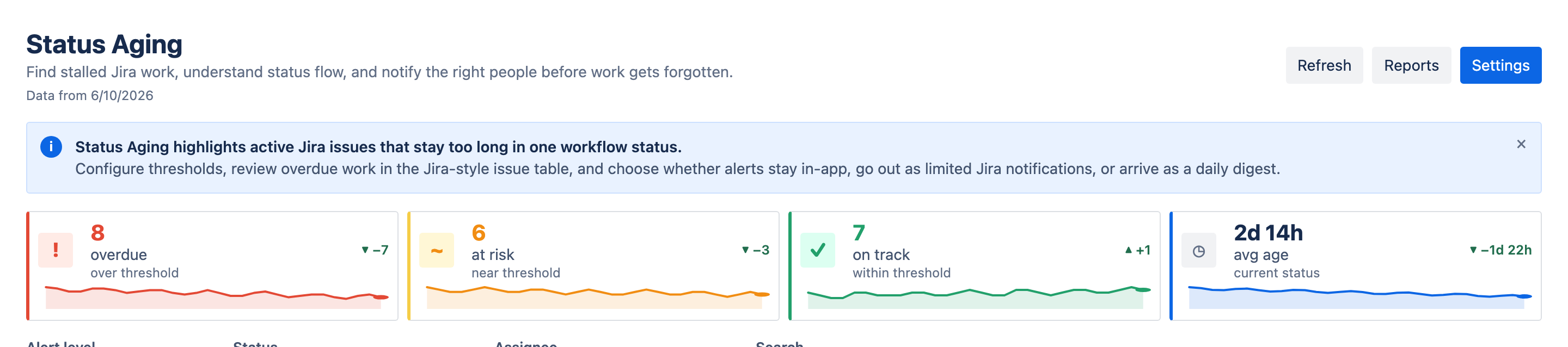
From there you can open a Flow report to see how a specific issue moved through the workflow, where it spent the most time, and which status is actually causing the delay. When you find something, you can act on it in place from the row menu — add a comment, snooze an alert you already know about for 24 hours, 3 days or a week (and unsnooze when the wait ends early), ignore work that is intentionally long-running, or export the flow data for a follow-up conversation. The point is to turn "what's stuck?" into a question you can answer at a glance, every day, rather than one you reconstruct after the fact.
And when the retro does come around, the lagging metrics from earlier in this article are one click away: the app's Reports view calculates a time-in-status matrix, per-status averages, an Aging WIP chart, ping-pong detection and a cumulative flow diagram from the same project scan — so the leading signal and the lagging evidence live in one place.
Status aging is not a new metric to obsess over. It is a way of noticing, earlier, the things that were always going to slow you down — and giving yourself the room to fix them while fixing still helps.