
 Jira · Guide
Most teams find out an issue is late the same way: the sprint review, the missed release date, the awkward status update to a stakeholder. By then the damage is done. The signal was there all along, sitting quietly in your workflow, but nobody was watching it. That signal is Jira time in status — the accumulated time each issue spends in each column of your board — and it is the metric that most reliably predicts a missed deadline before the deadline actually arrives.
The problem is not that Jira lacks the data. Every transition is timestamped. The problem is that time-in-status is buried in after-the-fact reports you only open when something has already gone wrong. This article explains what Jira time in status actually measures, how it differs from status aging, and how watching it live — with a threshold per status and an alert when work overstays — turns a lagging report into an early-warning signal.
What Jira time in status actually measures
Every Jira issue moves through a workflow: To Do, In Progress, In Review, Done, or whatever columns your team has defined. Each move from one status to the next is a transition, and Jira records when it happened. Time in status is simply the total time an issue has accumulated in a given status across its life.
That last part matters. An issue can enter In Review, bounce back to In Progress, then return to In Review again. Its time in the review status is the sum of both visits, not just the most recent one. Read across a whole board, this tells you something a burndown chart cannot: where work slows down, status by status, rather than just whether the total is going up or down.
- Per issue: how long this ticket has spent in each column, including repeat visits.
- Per status: where issues collectively pile up — the review queue, waiting-on-QA, blocked.
- Per workflow: which handoff consistently eats the most calendar time.
Time in status is not cycle time
Cycle time is the total elapsed time from when work starts to when it finishes. Time in status breaks that total into its parts, so you can see which specific stage is responsible for a long cycle time. One is the headline; the other is the diagnosis.
Time in status vs. status aging: the difference that matters
These two terms get used interchangeably, but they answer different questions, and the distinction changes how you act. Status aging is about the issue in front of you right now: how long has this in-flight ticket already sat, untouched, in its current status? It is a live number that only counts up until the issue moves. Time in status is the broader, accumulated view — the dwell time per status, summed across visits and often across many issues.
In practice you use them together. Time in status tells you which statuses are chronically slow, so you know where to set expectations. Status aging tells you which specific issue is breaching those expectations today, so you know what to chase. If you want the full picture of aging as a concept, we cover it in what is status aging in Jira; this piece is about the metric underneath it.
Time in status is the pattern; status aging is the alarm. The pattern tells you where to set the threshold, and the alarm tells you when a single issue has crossed it.
Why watching Jira time in status live beats an after-the-fact report
A monthly or end-of-sprint report on Jira time in status is genuinely useful for retrospectives. It shows you that your review stage averaged, say, longer than everything else, and you can plan around that next quarter. But a report is a post-mortem. It describes work that has already slipped.
The value of watching time in status live is that slippage is gradual and visible while it is happening. An issue does not miss its deadline in one dramatic step — it drifts. It sits in In Review a day longer than usual, then two, while everyone assumes someone else has picked it up. Watched live, that drift is a rising number you can see today. Watched only in a report, it is a fact you learn about next month, next to a deadline you have already missed.
- A report answers "where did we lose time last sprint?" — useful, but retrospective.
- A live view answers "which issue is overstaying its status right now?" — actionable while there is still time to act.
- The mechanism that converts one into the other is a threshold per status plus an alert when it is exceeded.
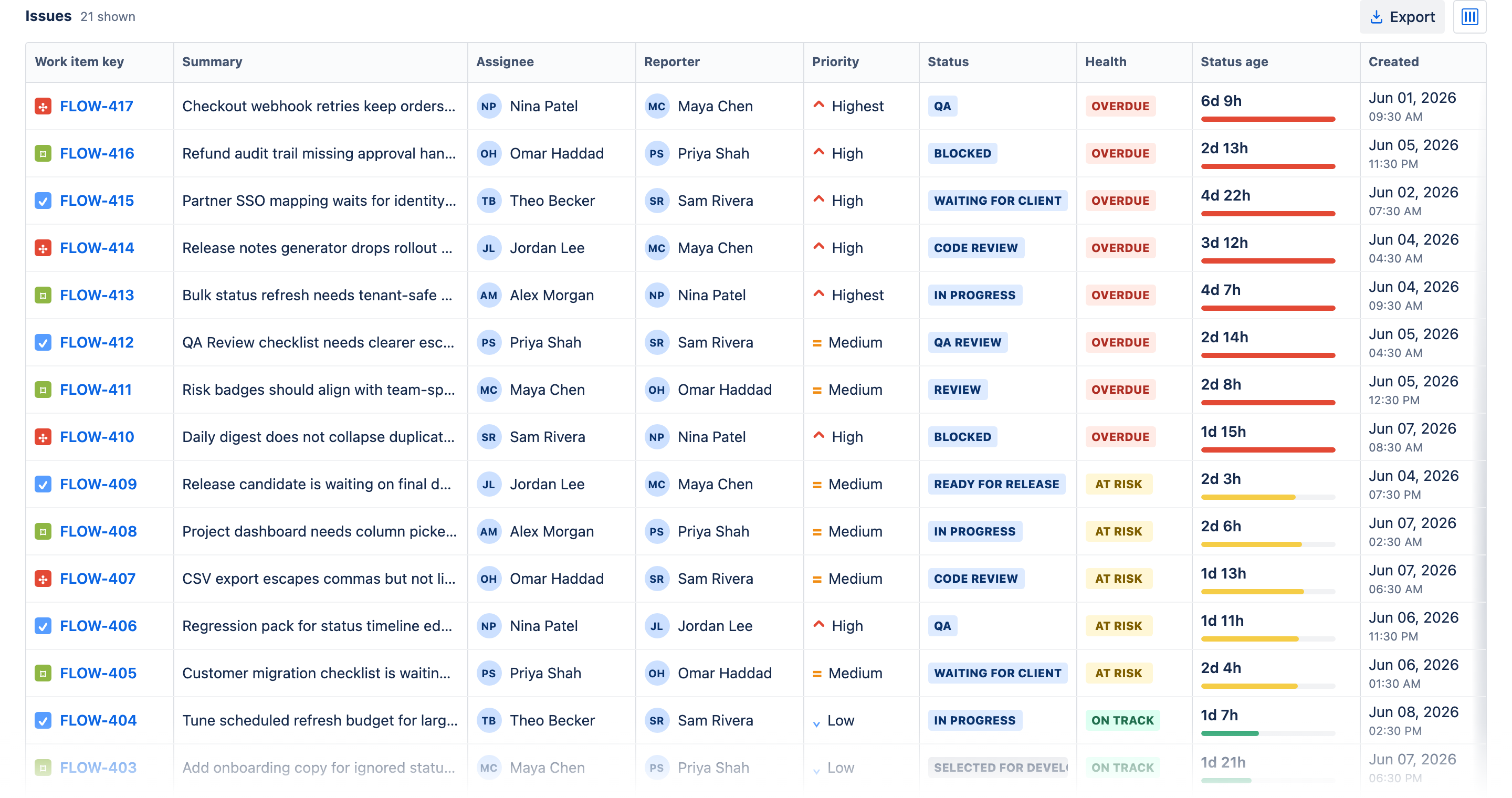
You do not have to choose between the live view and the report, either. Time in Status — Status Aging Alerts for Jira pairs its live dashboard with a Reports view: a time-in-status matrix, per-status averages, an Aging WIP chart, ping-pong detection, and a cumulative flow diagram — all calculated from the same project scan, so the retrospective numbers and the live alarm finally come from one place.
Turning Jira time in status into an early-warning signal
A number on a screen only helps if someone is looking at it. The way to make Jira time in status work as a leading indicator is to decide, per status, how long is too long — and then have the tool tell you when an issue crosses that line, rather than waiting for you to notice.
You set an expected threshold for each status based on the pattern you already observed in your time-in-status data. A quick triage status might have a short expectation; a review or QA status a longer one. When any issue exceeds the threshold for the status it is sitting in, it gets flagged as aging, and the alert surfaces it while the issue is still in flight. An at-risk percentage warns you a step earlier, before the line is actually crossed, and if your team does not work weekends you can count business hours only — so a Friday handoff does not look two days stale by Monday.
- Read the pattern: look at accumulated time in status to see what "normal" looks like for each column.
- Set a threshold per status: pick an expected dwell time that reflects that normal, not a wish.
- Alert on the exception: when an issue ages past its status threshold, it is flagged so a person can chase it.
Set thresholds from your own data
Do not guess a threshold in the abstract. Start from the time-in-status your board already shows and set the expectation slightly above your typical dwell for that status. That way the alert fires on genuine outliers — the issues actually at risk — not on every ticket that behaves normally.
This is exactly the mechanism behind Time in Status: it measures time-in-status across your issues, highlights the ones that have aged past what you expect — in the app, as rate-limited Jira notifications, or as a daily digest — and helps you see where work piles up in the workflow before that pile becomes a slip.
Acting on the signal before the deadline
An early-warning signal is only worth having if it changes what you do. Once time in status has flagged an aging issue, the response is usually one of a small handful of moves — and making that move a few days early is the entire point.
- Unblock it: a ticket stuck in review is often waiting on one named person; a nudge clears it.
- Reassign it: if the current owner is overloaded, the flag makes the case to move it.
- Re-scope or split it: an issue that overstays In Progress may be too big and should be broken down.
- Escalate honestly: if it genuinely cannot land in time, you now know early enough to reset the stakeholder's expectation instead of surprising them.
The common thread is time. Every one of those moves is cheap when you have days of runway and expensive when you have hours. For the practical routine of finding and clearing these issues, see how to find stuck Jira issues before they blow a deadline, which walks through the triage once the signal has fired.
Getting started with time in status
You do not need to instrument anything new to start. The transition timestamps already exist in your Jira; the work is to bring time in status into a view your team looks at regularly, set a sensible threshold per status, and treat the alerts as a to-do list rather than a report to file. Start with the one or two statuses where you already suspect work stalls — usually a review or a waiting stage — and expand once the alerts are earning their place.
Watched this way, time in status stops being a chart you open after a bad sprint and becomes the thing that stops the bad sprint from happening.