
 Jira · Guide
Some Jira issues quietly stop moving. The assignee is heads-down elsewhere, a review never got picked up, a ticket is blocked but nobody flagged it — and the card just sits in a column for days. By the time someone notices, the deadline is close. If you want to find stuck Jira issues before they turn into a fire drill, you need a reliable way to see how long work has been sitting still, not just where it is on the board.
The board view tells you the current status of every issue. What it doesn't tell you is time: how long each issue has been in that status. That single missing dimension is where most bottlenecks hide. This article walks through practical ways to surface aging work, from manual JQL and board habits to automated status-aging alerts.
Why stuck Jira issues are so easy to miss
A Jira board is a snapshot. It shows the present state, with no memory of how long an issue has been in that state. Two tickets in "In Review" look identical on the board even if one arrived an hour ago and the other has been waiting nine days.
Stuck work also tends to be invisible by nature. A blocked ticket usually isn't loudly failing — it's just quietly not progressing. Nobody gets an error. The assignee has moved on to something they can actually finish, and the aging issue slips down the list. This is closely related to status aging, the idea that the real signal isn't where an issue is but how long it has been there.
The result: your team's flow looks healthy on the board while a handful of issues silently eat the schedule. You only find them when a stakeholder asks, or when a sprint misses.
A board shows you position. Aging shows you problems.
How to find stuck Jira issues with JQL and board habits
You can get a long way with tools already in Jira. These approaches are manual, but they cost nothing and are a good first pass to find stuck Jira issues in a project.
Filter by how long since an issue last moved
Jira's updated field is a rough proxy for movement. A query like updated <= -7d AND statusCategory != Done surfaces open issues that haven't changed in a week. It's not perfect — a comment counts as an update, so a chatty-but-stalled ticket can look fresh — but it's a quick way to catch the obviously abandoned ones.
Watch the columns that tend to trap work
Handoff columns are where issues get stuck most: "Ready for Review", "Waiting on QA", "Blocked", "Awaiting Deploy". Anything that depends on a different person than the one who just finished is a candidate for aging. Scan those columns first.
- Pick the two or three statuses in your workflow that represent a handoff or an external dependency.
- Filter the board or run a JQL query for open issues in just those statuses.
- Sort by created or updated date, oldest first, so the longest-waiting work floats to the top.
- Look for issues that have been sitting far longer than similar work usually takes.
- Ask the assignee or reporter what's blocking each one — and whether it's truly blocked or just forgotten.
The limit of manual checksJQL and column scans only help when someone remembers to run them. Stuck issues are exactly the kind of thing that gets missed on a busy week, which is why teams eventually want something that watches for them automatically.
Measure time in status, not just last activity
The updated field is a blunt instrument. What you actually care about is time in status — how long an issue has continuously sat in the specific column it's in now. That's the metric that maps directly to a bottleneck.
Time in status is also the raw material for cycle time and flow analysis. If issues consistently pile up hours or days in "In Review", that column is where your process is leaking time, and no amount of pushing individual tickets will fix the underlying pattern. Measuring it turns "this feels slow" into "issues wait an average of three days here."
This is where Time in Status — Status Aging Alerts for Jira comes in. It tracks how long each issue has sat in every status — counting business hours only, if that is how your team works — so time-in-status becomes something you can actually see rather than something you reconstruct by hand. Instead of guessing whether a ticket is stuck, you have the number in front of you.
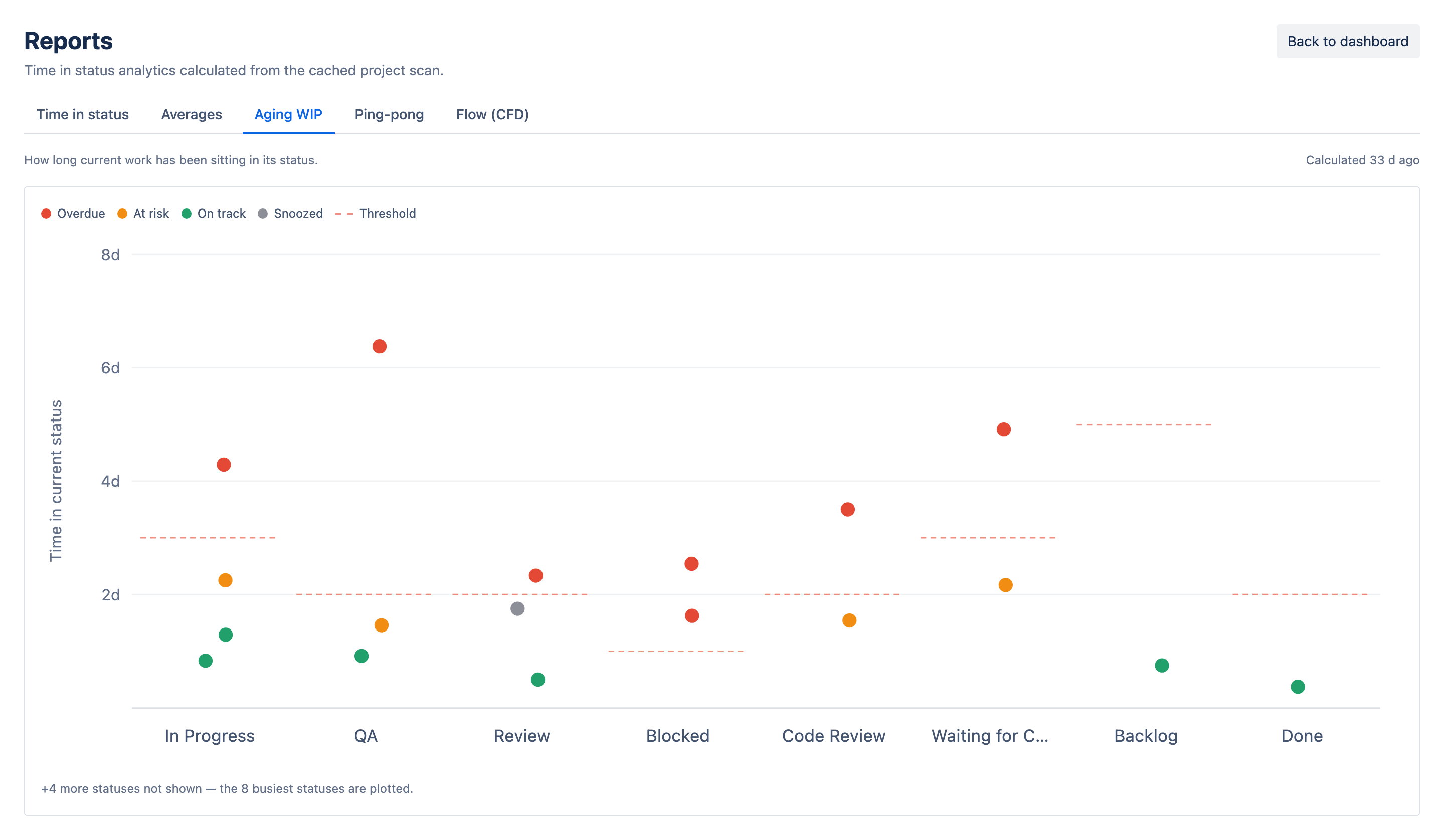
When you want the pattern behind the tickets, the same scan feeds a Reports view: an Aging WIP chart plots every in-flight issue's status age against its threshold, alongside a time-in-status matrix, per-status averages, ping-pong detection and a cumulative flow diagram — see the Time in Status product page for the full set.
Get alerted so you catch stuck issues early
Measuring aging is useful; being told about it is what changes outcomes. The point of tracking time in status is to catch a stuck issue on day two, not day nine — while there's still room to react before a deadline is at risk.
That's the job of automated aging alerts. Time in Status tracks time-in-status for your issues and alerts you when an issue ages past its expected time in a status — in the app, as rate-limited Jira notifications, or rolled into a daily digest. Instead of remembering to run a query, you get told when something has been sitting too long. The bottleneck comes to you.
- You stop relying on memory. The alert fires whether or not anyone thought to check the board that day.
- You catch problems while they're small. An issue flagged early is a quick nudge; the same issue found late is a missed sprint.
- You see patterns, not just incidents. When the same status keeps aging out, you've found a process problem worth fixing, not just a ticket to unblock.
Pair alerts with WIP limitsAging alerts tell you when work is stuck; WIP limits reduce how much work can get stuck at once. Together they keep flow honest — see status aging, WIP limits and SLAs for how they fit together.
A simple routine to keep work moving
Finding stuck issues shouldn't be a special project. Fold it into how the team already works:
- At standup, look at the oldest issues in your handoff columns first, not the newest tickets.
- Treat any issue that's aged past what's normal for its status as a talking point — who owns the next step?
- Let automated aging alerts flag the outliers between standups — and snooze the ones you already know about for 24 hours, 3 days or a week, so the list stays honest.
- When a status keeps producing aged issues, fix the workflow — add a clearer owner, split the step, or set an expectation — instead of firefighting one ticket at a time.
The goal isn't to chase every ticket. It's to make time itself visible, so the few issues that are genuinely stuck can't hide behind a tidy-looking board. If checklists are more your speed on the monday.com side, the same principle — surface what's aging or incomplete — shows up in tracking checklist progress too.