
 Jira · Guide
Every team that turns on aging alerts goes through the same arc. Week one: the alerts are read, issues get unstuck, everyone is pleased. Week four: there are thirty flags, twenty-five of them are "yes, we know", and the team has quietly learned to scroll past red. That learned blindness is alert fatigue, and it is more dangerous than having no alerts at all — because now the one flag that matters arrives pre-ignored.
The fix is not fewer alerts by accident; it is fewer alerts by design. Time in Status — Status Aging Alerts for Jira gives you a specific toolkit for that — per-status thresholds, an at-risk buffer, snooze and ignore controls with an audit trail, and notification channels that respect attention. This guide is the hygiene routine that ties them together.
Why alert fatigue happens
Fatigue is almost never caused by the volume of stuck work. It is caused by alerts that are wrong in a predictable way, so the brain builds a filter. The usual sources:
- One threshold for every status. A triage column where two days is fine and a review column where two days is a crisis cannot share a number. A global threshold guarantees one of them alerts constantly.
- Known delays re-alerting daily. The issue waiting on a vendor reply flags every morning, teaching everyone that flags can be safely skipped.
- Unmeasurable work in the pool. Long-running epics and parked spikes will never fit an operational threshold; every scan re-flags them anyway.
- Notifications with no ceiling. One bad Monday produces forty pings, and by Tuesday the channel is muted.
Each of those has a dedicated control, and each control is cheap. The rest of this guide takes them in order.
Thresholds tuned per status, not per team
The single highest-leverage fix is setting a separate threshold for each status. In Time in Status you pick statuses from your project's real workflow — read live from Jira, so the list is always the columns you actually have — and give each its own expectation: hours for a triage stage, days for review, longer for a waiting-on-customer state.
Where do the numbers come from? Not from ambition. Open the averages report and set each threshold slightly above the observed norm for that status — the approach covered in depth in the reports guide and time in status as a deadline metric. A threshold set from data flags outliers; a threshold set from wishes flags everything, and "everything" is what fatigue is made of.
Count the hours that count
If your thresholds keep breaching over weekends, the problem may be the clock, not the number. Business-hours counting pauses the timer outside working hours — see business hours vs calendar time before you loosen a threshold to survive Saturdays.
The at-risk buffer: an early lane that keeps overdue rare
A binary alert — fine until the moment it is a crisis — invites two bad settings: thresholds tight enough to warn early (and cry wolf) or loose enough to be quiet (and warn late). The at-risk percentage removes the dilemma by splitting the signal in two. Set it to, say, 80%, and an issue that has consumed 80% of its status threshold moves into the At risk lane on the dashboard, visually distinct from Overdue.
The effect on fatigue is direct: overdue stays rare, which keeps it meaningful — when something is red, it is genuinely late, not merely approaching. Meanwhile the at-risk lane gives you the early look without the alarm bell: a glance in standup at what is trending toward trouble, while there is still runway to act. Two lanes, two different levels of urgency, and neither trains anyone to look away.
Snooze vs ignore: two different sentences
Even with perfect thresholds, real work has legitimate exceptions — and how you handle them decides whether your alert list stays trustworthy. Time in Status puts both controls in the issue table's row menu, next to Open issue, Add comment and the Flow report:
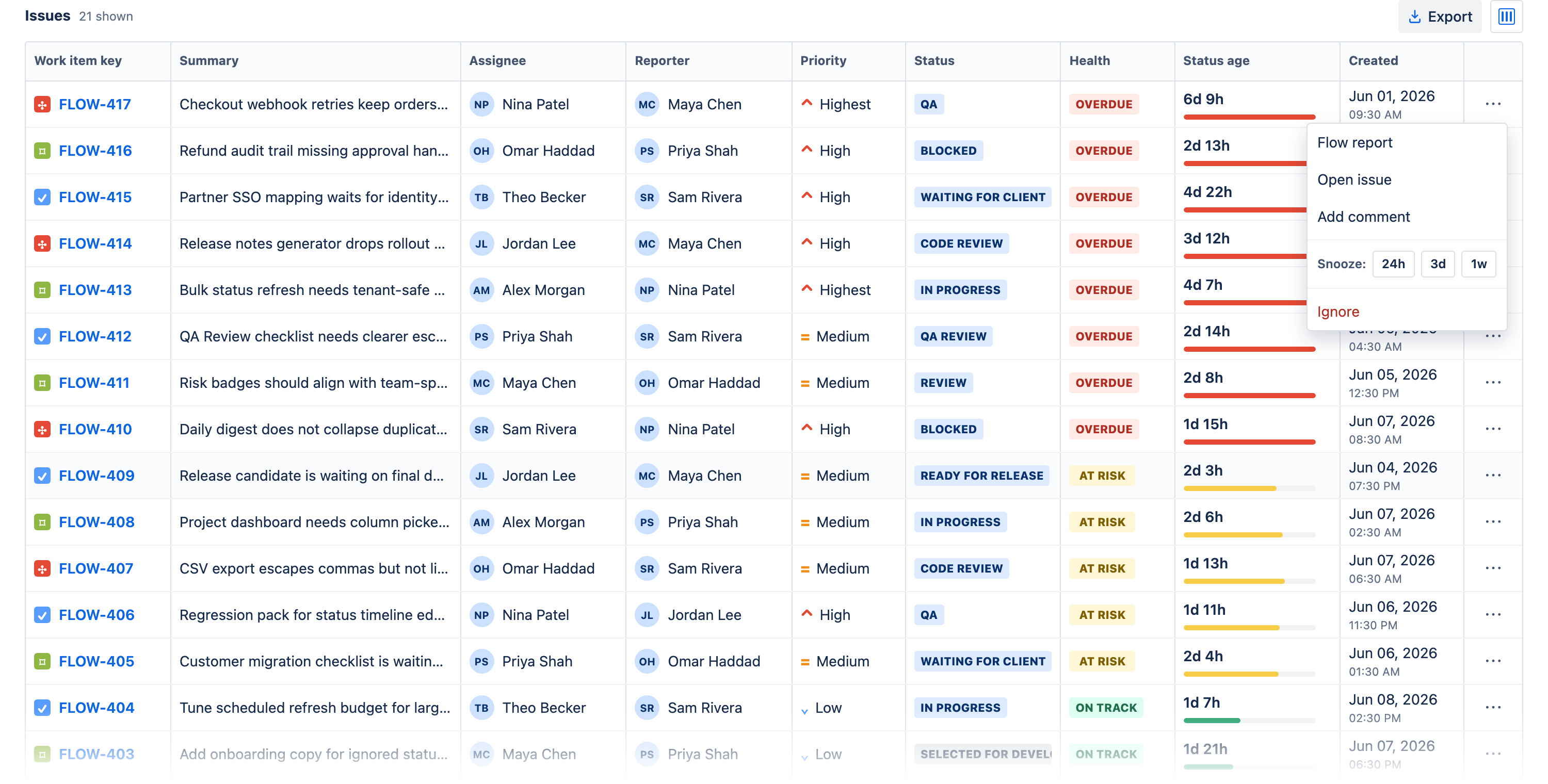
- Snooze (24h / 3d / 1w) says "known delay — check back later." Waiting on a vendor? Snooze 3 days. Owner back from PTO next week? Snooze 1 week. The alert disappears now and returns automatically when the window ends — no one has to remember to re-check, which is exactly the failure mode of mentally filtering a flag. A snoozed issue shows an Unsnooze chip if the situation resolves early.
- Ignore says "this issue should not be measured." The container epic that lives in In Progress for a quarter, the parked spike — work whose dwell time is not a signal. Ignore removes it from alerting indefinitely; Restore brings it back the moment it becomes normal work again.
The rule of thumb: if you can name the date the delay ends, snooze until then; if you cannot name a threshold that would ever be fair, ignore. What you should never do is the third option — leaving the alert firing and skipping it by eye. That is the habit that generalizes into skipping everything.
Keeping silences honest: Show snoozed and Show ignored
Snooze and ignore only stay safe because they are auditable. Silenced issues do not vanish — the Show snoozed and Show ignored filters on the issue table bring them back on demand, each with its Unsnooze or Restore action one click away. That gives the lead a simple weekly check: open each filter, scan the list, and ask whether every silence still has a reason. A snooze whose reason has evaporated gets unsnoozed; an ignored issue that turned back into deliverable work gets restored. Silences are cheap to grant precisely because they are cheap to revoke.
Notifications and the daily digest: match the channel to the urgency
The last fatigue source is delivery. An alert that interrupts is expensive attention, and expensive attention should be spent only where interruption changes the outcome. Time in Status gives you three tiers:
- In-app (the default). Alerts live on the dashboard, where the Overdue and At risk tiles and the filtered issue table are read in context. For anyone who opens the dashboard daily, this is enough — and it costs zero interruptions.
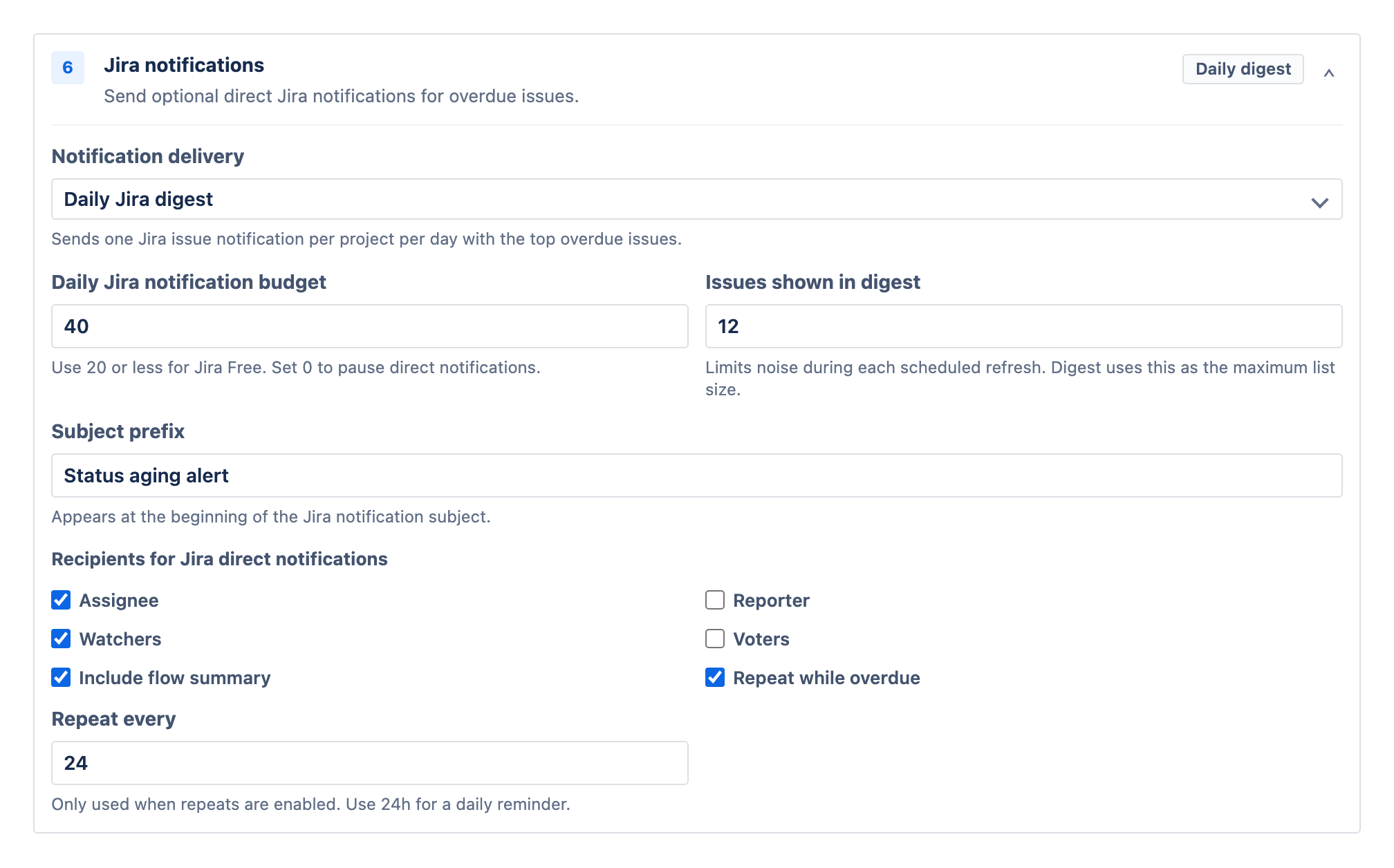
- Rate-limited Jira notifications. When you want pushes, they go out as native Jira notifications with a rate limit, so a Monday spike of breaches becomes a handful of pings, not forty. The limit is the point: it caps the worst day, which is the day fatigue is born.
- The daily digest. One scheduled summary of everything overdue and at risk. For most teams this is the best default for everything non-urgent: predictable, batchable, readable with coffee — and it converts alert-reading from an interruption into a routine.
A sane starting split: digest for the team, rate-limited notifications only for the statuses where hours genuinely matter, everything else in-app. You can always promote a status to noisier delivery later; demoting one after fatigue has set in is much harder.
A weekly hygiene routine
Alert hygiene is not a setup task; it is a small recurring habit. Fifteen minutes a week covers it:
- Clear the overdue lane — every red issue gets an action: unblock, reassign, split, snooze with a reason, or ignore with a reason. An emptyable overdue list is the whole game; the triage moves are in how to find stuck Jira issues.
- Audit the silences — open Show snoozed and Show ignored; unsnooze and restore whatever no longer deserves quiet.
- Fix chronic alarms at the threshold — any status that alerts every single week has a wrong number, not unlucky issues. Re-check it against the averages report and adjust.
- Watch the trend — the dashboard's sparklines and delta chips tell you whether overdue counts are drifting up between scans; a rising line is a process question, not an alerting question.
Do this for a month and the character of the alert list changes: it gets short, and everything on it is real. That is the entire goal — not silence, but a signal the team still believes.